Standard Spec
Our standard audio specs are:
WAV (.wav) / PCM codec / 16-bit or 24-bit / 44.1 kHz / Stereo
More information about each of these properties is below.
File Type
Workstation only accepts the following file types:
- WAV (.wav)
- FLAC (.flac)
- Apple Lossless (.m4a or .mp4).
Any other file types such as .mp3, .aac or .wma are not supported by our system.
Error Reasons
The file was either exported directly from the mastering program as an unsupported file type,
or an uncompressed master was transcoded to an unsupported file type.
How It’s Fixed
More information about each of these properties is below. Re-export the file from the mastering program or audio conversion tool. Check the export settings and confirm you’re exporting as .wav, .flac, .m4a or .mp4.
Codec
Each of the supported file types must be encoded with a specific codec. Any other file format/codec combinations are not accepted.
|
FILE TYPE |
CODEC |
|
.wav |
PCM |
|
.flac |
FLAC |
|
.mp4a |
AAC or ALAC |
|
.mp4 |
AAC or ALAC |
Error Reasons
The file was either exported from the mastering program with an unsupported codec, there was
an encoding error during the export, or the file’s header doesn’t accurately reflect the codec.
How It’s Fixed
Re-export the file from the mastering program or re-encode the file through another audio conversion tool (see Encoding Best Practices at the end of this document). Check the export settings and confirm
the file is being encoded per the spec above. Export the file without running other programs to maximize your computer’s resources and avoid encoding errors.
Bit Depth
All audio uploaded to Workstation must be 16 bit (CD quality) or 24 bit. Other bit depths are not supported
by our system.
Error Reasons
It’s likely that the audio was exported from the mastering software or audio conversion tool with a bit depth other than 16 or 24.
How It’s Fixed
Check the settings on your mastering software to confirm that you’re exporting to 16 or 24 bit. Check the bit depth of the source audio to confirm that you’re exporting to an equal or lower bit depth than the source to avoid upconverting the file.
Sample Rate
Workstation supports the following industry standard bit depth/sample rate combinations.
- 16 bit: 44.1kHz and 48kHz
- 24 bit: 44.1kHz, 48kHz, 88.2kHz, 96kHz, 176.4kHz, 192kHz
* Apple Lossless format is only accepted as 16-bit, 44.1kHz
Error Reasons
The audio was exported from the mastering software with an unsupported sample rate.
How It’s Fixed
Check the settings on your mastering software to confirm that you’re exporting to one of the above supported bit depth/sample rate combinations.
Audio Channels
Workstation requires all audio files to be two-channel stereo files with distinct left and right channels. Audio files with one channel are by definition mono audio, which we do not support.
You will also see an error if you attempt to upload a file with more than 2 channels,
such as 5.1 Surround Sound audio.
Error Reasons
The audio was exported from the mastering software with an incorrect number of channels.
This is not the same as the number of tracks within your project; a multi-track project can be
saved as a 2 channel stereo file.
How It’s Fixed
Check the export settings on your mastering software to confirm that you’re saving the project
as a two-channel stereo file.
Encoding Best Practices
During the troubleshooting process, we recommend standardizing your files by re-exporting them
from Audacity using the following settings:
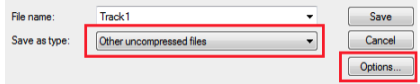
- Select File > Export Audio…
- Save as type: "Other uncompressed files," then click "Options..."
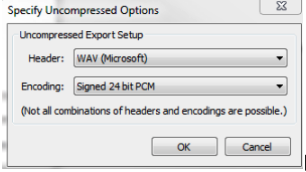
- In the "Specify Uncompressed Options" window, choose Header: WAV (Microsoft) and Encoding:
Signed 16 or 24 bit PCM.
- Then select "OK" and click "Save.”
For a walk-through of the Digital Product Builder see the below Video...